
Coalesce Wireless Collaboration System Create. Connect. Collaborate. Features: Create a wireless collaboration environment in any room using laptops, tablets, and smartphones. Unlimited users, any device. Compact form factor is easy to deploy behind flat panels and above projectors. Compatible with virtually any displays near you via HDMI connection. Details: Wireless, Real-Time CollaborationCreate, connect, and begin true collaboration with Coalesce. Everyone’s ideas are a few clicks away, and shared instantly with other users. Unlimited UsersCollaborate with more people. Coalesce allows an unlimited number of users to share ideas and information. Bring Your Own DeviceCast any device’s screen to the Coalesce-enabled display. Use your laptop, tablet, iOS, or Android device. For mobile devices, Coalesce directs you to the app store to download the free client app. Unlimited Shared ItemsEach connected user can share an unlimited number of items simultaneously. Live stream desktop, apps, docs, images, and videos. Dual-Network ModeConnect over wired, built-in wireless network, or both. Provide guest users the ability to connect to Coalesce and collaborate without sacrificing network security. Enterprise Remote ManagementUse Coalesce Central to monitor and manage any number of Coalesce units from a centralized, intuitive dashboard. Easy InstallationThe Coalesce unit fits behind displays, above a projector, or on a table. Leverage your existing infrastructure or deploy it as a hotspot using its built-in wireless access point. Touch InteractivityWith support for touch displays, Coalesce enables multiple users to work together or independently. Note: touch-enabled screen required. One-Click Software UpdatesAccess new features and upgrades on Coalesce with one-click software updates. Optional EncryptionProtect sensitive information via optional encryption for network traffic between Coalesce and user devices. Product includes: Coalesce unit 5-Volt international power supply (1) year free software updates Slimline HDMI cable Technical Specifications: Connectors (1) HDMI 1.4(1) RJ-45 Ethernet(1) USB 3.0(1) 5-VDC power connector Dimensions 0.7”H x 4.1”W x 4.1”D (1.7 x 10.5 x 10.5 cm) Mounting Type Console tabletop Weight 1.75 lb. (0.79 kg) Power Adapter Switching, changeable plug type for international power options Efficiency Level V Input 5 VDC Testing and Certifications Emissions FCC (home and office use) Regional Certifications Marks USA, Canada, Australia/New Zealand, China, Singapore, Mexico, Europe Safety UL® System Bluetooth 4.1 + HS Coalesce Software Pre-Installed Includes Android version of Coalesce server software built for wireless sharing. Graphics Processor Adreno™ 420 I/O USB 3.0 Internal Storage 2 GB RAM, 16 GB Flash Storage Operating System Android 5.1 Lollipop Processor QualComm Snapdragon™ S805, Krait 450 Streaming Video Support HD (1920 x 1080)HD SD (1280 x 720) Video Output HDMI 1.4 output with Audio Wireless Dual band, 802.11ac 2×2 Clients – Laptops and Mobile Devices Minimum Required Laptops and Tablet PCs: Intel Core 2 Duo 2.3 GHz, 2 GB RAM;IPads, Phones, and iPods: iPad 2 or later, iPhone Gen2 or later;Android Tablets and Phones: Phones/tablets with Android 2.2 or later Operating System Laptops and Tablet PCs: Windows XP, 7, 8, 10, OSX 10.7 or higher;IPads, Phones, and iPods: iOS version 6.0 or later;Android Tablets and Phones: Gingerbread OS (2.3.x) or later Recommended Laptops and Tablet PCs: Intel Core i7, 2.3 GHz, 6 GB RAM;IPads, Phones, and iPods: iPad/iPhone 3 or later with retina display;Android Tablets and Phones: Phone/tablets with Android 4.0 or later Coalesce Network Requirements Access Point Deployement Requirements Use built-in wireless access point function: requires Internet access to install software updates for Coalesce. Also requires Internet access to install Apple iOS and Android client aps and to update all client apps (Windows, Mac, Apple iOS, and Android). Network Connection, Minimum Bandwidth Required WIred or wireless connection with 20 Mbps minimum bandwidth;When running HD content, 50 Mbps minimum bandwidth Security Specifications Encryption 2048-bit length encryption key, Open SSL, HTTPS Network Interface Cards (1) Ethernet NIC and (1) wireless NIC Network Modes Wireless Access Point, Ethernet Network Deployment, Dual-Network (complete firewall or Internet bridge), Wireless Client Network Settings Accessed via Coalesce configuration panel and an admin password;Settings include DHCP or fixed address, DNS server, SSID Name (for wireless) Software Security and Access Options Disable/enable local configuration, open access, password lock, moderator mode, screen key Network, Ports, and Traffic Optional Ports TCP Port 80 (optional), TCP Port 443 (required for license and software updates), TCP Port 53200 (for display naming and discovery) Required Ports TCP Port 53100, TCP Port 53101, TCP Port 53102 NOTE: Technical specification weight is the unit weight. It is not the packaged shipping weight.
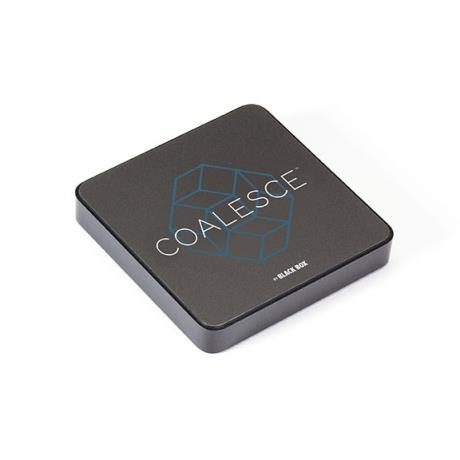
Coalesce Wireless Collaboration System
Coalesce Wireless Collaboration System
$2,127.50 Inc GST
Can Order From Supplier Delivery Times Vary as some shipments are Delayed - Contact For ETA
Contact AV Store for availability.
Brand:Coalesce
Additional information
| Weight | 1 kg |
|---|
Brand
Coalesce
Only logged in customers who have purchased this product may leave a review.
Related products
-

-
 $384.00 Inc GST
Can Order From Supplier Delivery Times Vary as some shipments are Delayed - Contact For ETA
Add to cart -

Video Distribution & HDMI Hardware
$700.00 Inc GSTCan Order From Supplier Delivery Times Vary as some shipments are Delayed - Contact For ETA
Add to cart -
Reviews
There are no reviews yet.